00404DB8  31 C0              xor eax, eax
00403629  57 F2 8C 1E 54 B1 A3 50
0040523C  E8 2A 01 00 00     call WndProc
0040C2DF  0F A2              cpuid
00403C3E  0F 6F 06           movq mm0, [esi]
00402D03  89 02 C6 95 FB 28 FB 09
0040F4D5  28 9E BE DB A8 78 BF A6
0040EEB5  EE 27 41 13 2A 1E A3 56
00409E6B  F7 C1 00 00 80 00  test ecx, 0x800000
004105AA  0F 6F 06           movq mm0, [esi]
004012F8  E8 2A 01 00 00     call WndProc
00402CB9  79 B0 D5 BB C8 47 DA 8D
0040A27D  C3                 ret
0040FA4C  FF 68 FF AE C8 86 0C 99
0040293B  89 E5              mov ebp, esp
00403D28  62 CB 78 4F FA 01 60 37
0040D9C7  83 EC 10           sub esp, 0x10
00406C42  C9                 leave
00403665  77 2B 27 EC 61 FB 07 8C
0040C89E  B8 01 00 00 00     mov eax, 1
0040F263  31 F1 F6 93 AF 25 E5 DD
0040447C  0F 28 C1           movaps xmm0, xmm1
004011B4  39 46 71 CA A2 8C 36 EB
0040F43A  6F 33 66 CC F7 FC 40 3D
004018EC  82 A8 09 33 0F 1C E7 95
0040213C  8B 45 08           mov eax, [ebp+8]
00403AA9  E4 E9 D6 9A 7F F4 6A 18
00407BB4  0F 6F 06           movq mm0, [esi]
0040C6AD  CB 26 C9 12 D9 BB 45 F2
00403BBA  74 0C              jz .frame_next
0040E35F  2E 31 07 13 71 7C A7 99
0040894D  C9                 leave
00404DBA  74 0C              jz .frame_next
00404692  4E 88 B9 FD A0 B3 DC EF
00408545  C5 FC 58 C1        vaddps ymm0, ymm0, ymm1
004036B7  B8 01 00 00 00     mov eax, 1
0041093E  3F 79 F5 03 32 03 94 BC
0040DF97  C5 FC 58 C1        vaddps ymm0, ymm0, ymm1
00406ED0  47 50 09 2E 0E B3 9E 5C
0040DD33  55                 push ebp
004043E3  8B 45 08           mov eax, [ebp+8]
0040FA68  31 C0              xor eax, eax
0040A320  3A 2D 7F 62 DA D3 46 0E
0040B903  F8 6A 16 6D 88 6F 46 22
0040D77D  C2 C5 23 5C 61 C8 DF 2A
00404D20  B9 A4 C6 37 33 65 4C D0
00404DB8  31 C0              xor eax, eax
00403629  57 F2 8C 1E 54 B1 A3 50
0040523C  E8 2A 01 00 00     call WndProc
0040C2DF  0F A2              cpuid
00403C3E  0F 6F 06           movq mm0, [esi]
00402D03  89 02 C6 95 FB 28 FB 09
0040F4D5  28 9E BE DB A8 78 BF A6
0040EEB5  EE 27 41 13 2A 1E A3 56
00409E6B  F7 C1 00 00 80 00  test ecx, 0x800000
004105AA  0F 6F 06           movq mm0, [esi]
004012F8  E8 2A 01 00 00     call WndProc
00402CB9  79 B0 D5 BB C8 47 DA 8D
0040A27D  C3                 ret
0040FA4C  FF 68 FF AE C8 86 0C 99
0040293B  89 E5              mov ebp, esp
00403D28  62 CB 78 4F FA 01 60 37
0040D9C7  83 EC 10           sub esp, 0x10
00406C42  C9                 leave
00403665  77 2B 27 EC 61 FB 07 8C
0040C89E  B8 01 00 00 00     mov eax, 1
0040F263  31 F1 F6 93 AF 25 E5 DD
0040447C  0F 28 C1           movaps xmm0, xmm1
004011B4  39 46 71 CA A2 8C 36 EB
0040F43A  6F 33 66 CC F7 FC 40 3D
004018EC  82 A8 09 33 0F 1C E7 95
0040213C  8B 45 08           mov eax, [ebp+8]
00403AA9  E4 E9 D6 9A 7F F4 6A 18
00407BB4  0F 6F 06           movq mm0, [esi]
0040C6AD  CB 26 C9 12 D9 BB 45 F2
00403BBA  74 0C              jz .frame_next
0040E35F  2E 31 07 13 71 7C A7 99
0040894D  C9                 leave
00404DBA  74 0C              jz .frame_next
00404692  4E 88 B9 FD A0 B3 DC EF
00408545  C5 FC 58 C1        vaddps ymm0, ymm0, ymm1
004036B7  B8 01 00 00 00     mov eax, 1
0041093E  3F 79 F5 03 32 03 94 BC
0040DF97  C5 FC 58 C1        vaddps ymm0, ymm0, ymm1
00406ED0  47 50 09 2E 0E B3 9E 5C
0040DD33  55                 push ebp
004043E3  8B 45 08           mov eax, [ebp+8]
0040FA68  31 C0              xor eax, eax
0040A320  3A 2D 7F 62 DA D3 46 0E
0040B903  F8 6A 16 6D 88 6F 46 22
0040D77D  C2 C5 23 5C 61 C8 DF 2A
00404D20  B9 A4 C6 37 33 65 4C D0
00405758  23 BD B2 DE C1 6A 77 E6
0040C4DF  11 95 1F C9 8E FB 3A 30
00409B5E  83 EC 10           sub esp, 0x10
0040329C  0F 6F 06           movq mm0, [esi]
0040F8D6  FF 15 34 12 40 00  call [CreateWindowExW]
004019B6  89 E5              mov ebp, esp
004065CF  B3 20 D5 97 CE AE CC F1
00403651  83 10 C3 0B 0F 77 4B BD
004082EF  3D D7 96 94 A5 73 55 4E
0040297E  83 EC 10           sub esp, 0x10
0040BEB0  06 4E EB FF 88 13 7C A2
0040410F  5D C4 FF B4 30 40 9B E7
004037E0  8B 45 08           mov eax, [ebp+8]
0040F82D  0F 28 C1           movaps xmm0, xmm1
0040CDF1  23 C3 2F CB B0 C3 8A E5
0040B9CA  74 0C              jz .frame_next
004032E5  7B EE 98 1E 60 0D 4D 6F
0040DEB6  A3 BA 1C 2A CC 89 75 BD
0040B19A  B8 01 00 00 00     mov eax, 1
0040969D  8D 2A B9 C4 B4 90 67 76
00410836  1C 7F 8B 5D 53 D0 54 6D
0040A2B1  F7 C1 00 00 80 00  test ecx, 0x800000
00405398  D0 38 36 C7 CA C8 46 C8
00401F16  55                 push ebp
0040A6C0  55                 push ebp
0040E8F2  83 EC 10           sub esp, 0x10
00403FED  55                 push ebp
00405D55  00 A4 54 D0 59 30 C6 30
00409413  26 38 6E A5 8D AF 2D E1
00407529  31 C0              xor eax, eax
0040287B  E8 2A 01 00 00     call WndProc
004028AB  89 E5              mov ebp, esp
004083AE  80 5F 2C 16 85 17 AA 91
004038C0  8B 45 08           mov eax, [ebp+8]
00402AAC  8B 45 08           mov eax, [ebp+8]
00402567  94 76 56 BE 71 E5 40 62
0040391C  8B 45 08           mov eax, [ebp+8]
0040DE45  FF 15 34 12 40 00  call [CreateWindowExW]
0040C8A2  AF F5 B4 EE 31 7A 7B DB
0040B0FA  83 EC 10           sub esp, 0x10
004057EA  74 0C              jz .frame_next
0040BD24  0F A2              cpuid
00410A24  4A CC 44 A5 E7 A7 26 4C
00408C4A  8D 47 23 45 33 8F 5C 94
004011F4  31 C0              xor eax, eax
0040C137  20 50 F2 A0 33 3B E0 6D
00405758  23 BD B2 DE C1 6A 77 E6
0040C4DF  11 95 1F C9 8E FB 3A 30
00409B5E  83 EC 10           sub esp, 0x10
0040329C  0F 6F 06           movq mm0, [esi]
0040F8D6  FF 15 34 12 40 00  call [CreateWindowExW]
004019B6  89 E5              mov ebp, esp
004065CF  B3 20 D5 97 CE AE CC F1
00403651  83 10 C3 0B 0F 77 4B BD
004082EF  3D D7 96 94 A5 73 55 4E
0040297E  83 EC 10           sub esp, 0x10
0040BEB0  06 4E EB FF 88 13 7C A2
0040410F  5D C4 FF B4 30 40 9B E7
004037E0  8B 45 08           mov eax, [ebp+8]
0040F82D  0F 28 C1           movaps xmm0, xmm1
0040CDF1  23 C3 2F CB B0 C3 8A E5
0040B9CA  74 0C              jz .frame_next
004032E5  7B EE 98 1E 60 0D 4D 6F
0040DEB6  A3 BA 1C 2A CC 89 75 BD
0040B19A  B8 01 00 00 00     mov eax, 1
0040969D  8D 2A B9 C4 B4 90 67 76
00410836  1C 7F 8B 5D 53 D0 54 6D
0040A2B1  F7 C1 00 00 80 00  test ecx, 0x800000
00405398  D0 38 36 C7 CA C8 46 C8
00401F16  55                 push ebp
0040A6C0  55                 push ebp
0040E8F2  83 EC 10           sub esp, 0x10
00403FED  55                 push ebp
00405D55  00 A4 54 D0 59 30 C6 30
00409413  26 38 6E A5 8D AF 2D E1
00407529  31 C0              xor eax, eax
0040287B  E8 2A 01 00 00     call WndProc
004028AB  89 E5              mov ebp, esp
004083AE  80 5F 2C 16 85 17 AA 91
004038C0  8B 45 08           mov eax, [ebp+8]
00402AAC  8B 45 08           mov eax, [ebp+8]
00402567  94 76 56 BE 71 E5 40 62
0040391C  8B 45 08           mov eax, [ebp+8]
0040DE45  FF 15 34 12 40 00  call [CreateWindowExW]
0040C8A2  AF F5 B4 EE 31 7A 7B DB
0040B0FA  83 EC 10           sub esp, 0x10
004057EA  74 0C              jz .frame_next
0040BD24  0F A2              cpuid
00410A24  4A CC 44 A5 E7 A7 26 4C
00408C4A  8D 47 23 45 33 8F 5C 94
004011F4  31 C0              xor eax, eax
0040C137  20 50 F2 A0 33 3B E0 6D
004060F8  8D 54 57 65 91 48 CF 79
0040C7C9  0F 6F 06           movq mm0, [esi]
0040F94E  FF 69 75 30 35 94 0C 23
0040274D  B8 0B 65 17 EA FA 21 C6
0040F66B  A2 EB 53 F4 E4 DA 3D 6D
00401683  FA 45 03 F3 D0 F2 24 57
00404F84  B8 35 57 47 08 17 7F 0E
0040AC7B  FF 15 34 12 40 00  call [CreateWindowExW]
0040C5F1  55 FD 72 7E 40 05 59 1A
00405188  89 4F A0 D9 74 9E B6 74
0040AB40  C1 84 0F 03 7F 4B 86 FD
00406FB4  C9                 leave
0040F834  D6 9B 65 35 DF CB B4 43
0040EADB  89 E5              mov ebp, esp
00401EC2  FA 0D 63 2F 07 63 A2 7E
00404B66  5E 8E 43 97 43 19 F0 39
00405278  F7 C1 00 00 80 00  test ecx, 0x800000
00403C6E  BA A5 55 C8 A6 86 41 D3
0040C19C  C9                 leave
0040574F  B8 01 00 00 00     mov eax, 1
00402245  0F 28 C1           movaps xmm0, xmm1
00404A20  C5 FC 58 C1        vaddps ymm0, ymm0, ymm1
0040B90E  FF 15 34 12 40 00  call [CreateWindowExW]
0040B3B6  C9                 leave
0040FB0D  1A DB AA DF 6B 61 00 2E
0040FA95  92 77 D6 8B 97 7B 86 4C
0040ED30  46 0C 85 46 23 2B 92 C2
00409B16  B4 56 A0 B8 F9 3E A9 08
00404D94  C3                 ret
0040EE82  C5 FC 58 C1        vaddps ymm0, ymm0, ymm1
004066B4  E8 2A 01 00 00     call WndProc
00405EA7  C0 C1 CF 04 49 F2 F4 A8
00404C83  D6 7C 93 4F B3 8E CC 79
0040924E  3C 17 99 60 AE 54 41 57
00406A7C  0F A2              cpuid
00405359  FE D6 6F 19 D4 61 06 59
00407B89  E7 F3 7A 07 89 4F CE 22
004035C4  1D DE AF 72 07 3C 63 B9
0040AD05  E4 3F 1B 61 3B 3A BC 21
004040F7  31 C0              xor eax, eax
00408A01  E8 2A 01 00 00     call WndProc
004108D8  DF C9 DD 09 47 AB 64 83
0040C237  0F 28 C1           movaps xmm0, xmm1
0040CFD6  5C 9A A6 A3 DE E0 D5 FE
00410E89  C5 FC 58 C1        vaddps ymm0, ymm0, ymm1
00404DD0  0F A2              cpuid
004060F8  8D 54 57 65 91 48 CF 79
0040C7C9  0F 6F 06           movq mm0, [esi]
0040F94E  FF 69 75 30 35 94 0C 23
0040274D  B8 0B 65 17 EA FA 21 C6
0040F66B  A2 EB 53 F4 E4 DA 3D 6D
00401683  FA 45 03 F3 D0 F2 24 57
00404F84  B8 35 57 47 08 17 7F 0E
0040AC7B  FF 15 34 12 40 00  call [CreateWindowExW]
0040C5F1  55 FD 72 7E 40 05 59 1A
00405188  89 4F A0 D9 74 9E B6 74
0040AB40  C1 84 0F 03 7F 4B 86 FD
00406FB4  C9                 leave
0040F834  D6 9B 65 35 DF CB B4 43
0040EADB  89 E5              mov ebp, esp
00401EC2  FA 0D 63 2F 07 63 A2 7E
00404B66  5E 8E 43 97 43 19 F0 39
00405278  F7 C1 00 00 80 00  test ecx, 0x800000
00403C6E  BA A5 55 C8 A6 86 41 D3
0040C19C  C9                 leave
0040574F  B8 01 00 00 00     mov eax, 1
00402245  0F 28 C1           movaps xmm0, xmm1
00404A20  C5 FC 58 C1        vaddps ymm0, ymm0, ymm1
0040B90E  FF 15 34 12 40 00  call [CreateWindowExW]
0040B3B6  C9                 leave
0040FB0D  1A DB AA DF 6B 61 00 2E
0040FA95  92 77 D6 8B 97 7B 86 4C
0040ED30  46 0C 85 46 23 2B 92 C2
00409B16  B4 56 A0 B8 F9 3E A9 08
00404D94  C3                 ret
0040EE82  C5 FC 58 C1        vaddps ymm0, ymm0, ymm1
004066B4  E8 2A 01 00 00     call WndProc
00405EA7  C0 C1 CF 04 49 F2 F4 A8
00404C83  D6 7C 93 4F B3 8E CC 79
0040924E  3C 17 99 60 AE 54 41 57
00406A7C  0F A2              cpuid
00405359  FE D6 6F 19 D4 61 06 59
00407B89  E7 F3 7A 07 89 4F CE 22
004035C4  1D DE AF 72 07 3C 63 B9
0040AD05  E4 3F 1B 61 3B 3A BC 21
004040F7  31 C0              xor eax, eax
00408A01  E8 2A 01 00 00     call WndProc
004108D8  DF C9 DD 09 47 AB 64 83
0040C237  0F 28 C1           movaps xmm0, xmm1
0040CFD6  5C 9A A6 A3 DE E0 D5 FE
00410E89  C5 FC 58 C1        vaddps ymm0, ymm0, ymm1
00404DD0  0F A2              cpuid
00406A97  C3                 ret
0040FBBB  C9                 leave
00407104  28 0B BA EB 94 3C 6B 35
00405440  83 EC 10           sub esp, 0x10
004049DC  8B 45 08           mov eax, [ebp+8]
004036AB  B3 93 2D CD A5 CB F9 2D
004047C2  74 0C              jz .frame_next
00403418  0F 1A 1B E7 88 B5 03 AD
0040F4BA  C3                 ret
0040E87E  9A 8B 3B 11 08 9A D4 19
0040F9FF  0F 6F 06           movq mm0, [esi]
0040C12F  AD 26 61 33 83 5C 0E E4
00408513  8E 11 03 62 46 4E A0 8C
0040937D  8B 45 08           mov eax, [ebp+8]
004094DE  F7 C1 00 00 80 00  test ecx, 0x800000
00409C14  89 E5              mov ebp, esp
0040C121  96 74 49 CC F3 7D 14 46
00410700  72 05 48 93 1B 7B EE 97
00403B5E  D0 DE 27 FB 24 A4 F2 9C
004087E0  55                 push ebp
0040FD48  66 4A A8 32 A5 B6 B8 C0
00404940  F1 4C 7C 02 8E 12 C2 AF
00403E9D  55                 push ebp
00405F4B  CC E5 2A DA 20 96 3D 36
004036DB  8B 45 08           mov eax, [ebp+8]
00404819  67 C4 3F AA 32 DE B1 8F
0040B61D  C3                 ret
00402096  50 80 9A DB BE FE 2F DD
00402593  FF 15 34 12 40 00  call [CreateWindowExW]
00406361  0F 28 C1           movaps xmm0, xmm1
004010C6  83 EC 10           sub esp, 0x10
00405210  46 4C 4F AD A4 57 14 6C
0040EF95  C3                 ret
0040C0BB  8B 45 08           mov eax, [ebp+8]
00409195  55                 push ebp
00408535  07 1B 65 BF FA F2 74 51
00408209  31 C0              xor eax, eax
004072E8  31 C0              xor eax, eax
0040D381  74 0C              jz .frame_next
0040872C  B8 01 00 00 00     mov eax, 1
004093C1  2B 7F 3E 0B 6E 76 08 34
0040E9A1  10 61 6F 29 EB 32 A8 63
0040D82C  0F 28 C1           movaps xmm0, xmm1
00401ACB  83 EC 10           sub esp, 0x10
00410FDC  E7 C7 22 97 B7 03 3D F5
00409964  FF 15 34 12 40 00  call [CreateWindowExW]
00406A97  C3                 ret
0040FBBB  C9                 leave
00407104  28 0B BA EB 94 3C 6B 35
00405440  83 EC 10           sub esp, 0x10
004049DC  8B 45 08           mov eax, [ebp+8]
004036AB  B3 93 2D CD A5 CB F9 2D
004047C2  74 0C              jz .frame_next
00403418  0F 1A 1B E7 88 B5 03 AD
0040F4BA  C3                 ret
0040E87E  9A 8B 3B 11 08 9A D4 19
0040F9FF  0F 6F 06           movq mm0, [esi]
0040C12F  AD 26 61 33 83 5C 0E E4
00408513  8E 11 03 62 46 4E A0 8C
0040937D  8B 45 08           mov eax, [ebp+8]
004094DE  F7 C1 00 00 80 00  test ecx, 0x800000
00409C14  89 E5              mov ebp, esp
0040C121  96 74 49 CC F3 7D 14 46
00410700  72 05 48 93 1B 7B EE 97
00403B5E  D0 DE 27 FB 24 A4 F2 9C
004087E0  55                 push ebp
0040FD48  66 4A A8 32 A5 B6 B8 C0
00404940  F1 4C 7C 02 8E 12 C2 AF
00403E9D  55                 push ebp
00405F4B  CC E5 2A DA 20 96 3D 36
004036DB  8B 45 08           mov eax, [ebp+8]
00404819  67 C4 3F AA 32 DE B1 8F
0040B61D  C3                 ret
00402096  50 80 9A DB BE FE 2F DD
00402593  FF 15 34 12 40 00  call [CreateWindowExW]
00406361  0F 28 C1           movaps xmm0, xmm1
004010C6  83 EC 10           sub esp, 0x10
00405210  46 4C 4F AD A4 57 14 6C
0040EF95  C3                 ret
0040C0BB  8B 45 08           mov eax, [ebp+8]
00409195  55                 push ebp
00408535  07 1B 65 BF FA F2 74 51
00408209  31 C0              xor eax, eax
004072E8  31 C0              xor eax, eax
0040D381  74 0C              jz .frame_next
0040872C  B8 01 00 00 00     mov eax, 1
004093C1  2B 7F 3E 0B 6E 76 08 34
0040E9A1  10 61 6F 29 EB 32 A8 63
0040D82C  0F 28 C1           movaps xmm0, xmm1
00401ACB  83 EC 10           sub esp, 0x10
00410FDC  E7 C7 22 97 B7 03 3D F5
00409964  FF 15 34 12 40 00  call [CreateWindowExW]
00407437  0F 28 C1           movaps xmm0, xmm1
004092EC  C5 FC 58 C1        vaddps ymm0, ymm0, ymm1
00404087  80 9E BD 58 55 90 90 6B
00402F60  1D 3E A6 3C 29 00 16 6E
0040604D  34 AD F8 39 A8 8A 56 A5
00402880  0F A2              cpuid
0040617E  0F 6F 06           movq mm0, [esi]
00410D20  0F A2              cpuid
0040DE98  F3 BD 81 42 F3 20 E2 ED
00408BED  0F 6F 06           movq mm0, [esi]
00409C58  9C E2 F8 BF A2 3B B0 C2
00407365  57 6B 9A 18 C9 EC 83 3A
00402329  C5 FC 58 C1        vaddps ymm0, ymm0, ymm1
00403D18  8B 45 08           mov eax, [ebp+8]
0040636A  24 01 74 A6 53 8E AE 9D
00401CA0  FF 15 34 12 40 00  call [CreateWindowExW]
004073E9  A3 7F 2F 49 A5 5C 47 6B
00405157  F7 C1 00 00 80 00  test ecx, 0x800000
0040A092  91 95 53 E9 E5 1A DD D5
00405DB6  C7 85 D7 3E 51 B9 21 30
00408C6B  3E 7B E2 B6 37 3E 60 C7
00406C3A  0F 6F 06           movq mm0, [esi]
00402C00  0F 28 C1           movaps xmm0, xmm1
0040D01F  F7 C1 00 00 80 00  test ecx, 0x800000
00403F24  A2 47 C6 40 ED D4 6A 59
0040FFB7  F7 C1 00 00 80 00  test ecx, 0x800000
0040B1FB  0F A2              cpuid
00405B62  31 C0              xor eax, eax
00404F8F  F7 C1 00 00 80 00  test ecx, 0x800000
0040F9AF  0F 6F 06           movq mm0, [esi]
004088EE  BD E1 F0 65 E4 33 DE 74
0040CFC9  49 46 BA 0B 28 F2 7C 02
0040A5DB  55                 push ebp
0040B82D  83 EC 10           sub esp, 0x10
0040AB4A  38 B8 D9 A2 6E 7F 34 AF
004076DA  74 0C              jz .frame_next
0040E43D  BD 26 E1 9F B0 EF 4D 39
00406B79  C3                 ret
004103F4  0F 6F 06           movq mm0, [esi]
0040702A  C3                 ret
00409533  89 E5              mov ebp, esp
0040F739  31 C0              xor eax, eax
00403E08  74 0C              jz .frame_next
004020F2  1C DD 80 84 53 FF F5 37
004101AF  A1 79 AA 93 6D 0C 21 C8
00401560  0F 28 C1           movaps xmm0, xmm1
00407437  0F 28 C1           movaps xmm0, xmm1
004092EC  C5 FC 58 C1        vaddps ymm0, ymm0, ymm1
00404087  80 9E BD 58 55 90 90 6B
00402F60  1D 3E A6 3C 29 00 16 6E
0040604D  34 AD F8 39 A8 8A 56 A5
00402880  0F A2              cpuid
0040617E  0F 6F 06           movq mm0, [esi]
00410D20  0F A2              cpuid
0040DE98  F3 BD 81 42 F3 20 E2 ED
00408BED  0F 6F 06           movq mm0, [esi]
00409C58  9C E2 F8 BF A2 3B B0 C2
00407365  57 6B 9A 18 C9 EC 83 3A
00402329  C5 FC 58 C1        vaddps ymm0, ymm0, ymm1
00403D18  8B 45 08           mov eax, [ebp+8]
0040636A  24 01 74 A6 53 8E AE 9D
00401CA0  FF 15 34 12 40 00  call [CreateWindowExW]
004073E9  A3 7F 2F 49 A5 5C 47 6B
00405157  F7 C1 00 00 80 00  test ecx, 0x800000
0040A092  91 95 53 E9 E5 1A DD D5
00405DB6  C7 85 D7 3E 51 B9 21 30
00408C6B  3E 7B E2 B6 37 3E 60 C7
00406C3A  0F 6F 06           movq mm0, [esi]
00402C00  0F 28 C1           movaps xmm0, xmm1
0040D01F  F7 C1 00 00 80 00  test ecx, 0x800000
00403F24  A2 47 C6 40 ED D4 6A 59
0040FFB7  F7 C1 00 00 80 00  test ecx, 0x800000
0040B1FB  0F A2              cpuid
00405B62  31 C0              xor eax, eax
00404F8F  F7 C1 00 00 80 00  test ecx, 0x800000
0040F9AF  0F 6F 06           movq mm0, [esi]
004088EE  BD E1 F0 65 E4 33 DE 74
0040CFC9  49 46 BA 0B 28 F2 7C 02
0040A5DB  55                 push ebp
0040B82D  83 EC 10           sub esp, 0x10
0040AB4A  38 B8 D9 A2 6E 7F 34 AF
004076DA  74 0C              jz .frame_next
0040E43D  BD 26 E1 9F B0 EF 4D 39
00406B79  C3                 ret
004103F4  0F 6F 06           movq mm0, [esi]
0040702A  C3                 ret
00409533  89 E5              mov ebp, esp
0040F739  31 C0              xor eax, eax
00403E08  74 0C              jz .frame_next
004020F2  1C DD 80 84 53 FF F5 37
004101AF  A1 79 AA 93 6D 0C 21 C8
00401560  0F 28 C1           movaps xmm0, xmm1
00407DD7  CD 1A 48 FB 00 E2 D9 30
0040D088  89 E5              mov ebp, esp
0040F3E9  8B 45 08           mov eax, [ebp+8]
00410A80  89 E5              mov ebp, esp
004052F0  0F 6F 06           movq mm0, [esi]
00403D1A  C5 FC 58 C1        vaddps ymm0, ymm0, ymm1
0040598F  9D C2 8E F8 45 19 5C E2
00403781  87 67 87 02 1E 44 FC D7
0040C876  C9                 leave
0040B1BD  C9                 leave
00406A4E  B4 D3 5D 12 9E 2E C5 5E
00402429  0F 6F 06           movq mm0, [esi]
00402F22  2D 01 6A 31 C9 61 C8 A1
00409137  8B 45 08           mov eax, [ebp+8]
00403F94  0F A2              cpuid
004074AD  89 E5              mov ebp, esp
0040B4CF  58 E8 76 4E 37 F5 D4 C6
0040D65E  0F 28 C1           movaps xmm0, xmm1
00402B67  65 01 08 5B 20 44 6F FB
0040CB82  45 11 F5 23 52 4D 7F D7
0040B65A  74 0C              jz .frame_next
00401E60  5F 8D 1D 93 16 58 CB 0F
0040CCAF  B8 BC BE A9 7B 22 00 BD
00401003  C3                 ret
004012C1  DE C8 30 DA D5 78 11 69
00407FC7  0F A2              cpuid
0040B54E  0F A2              cpuid
004019F6  0F 28 C1           movaps xmm0, xmm1
00405091  C9                 leave
0040E9FB  E3 C1 EF 1C D3 DE D3 59
0040B112  E0 E7 23 CC 98 8A A7 40
004102FF  E7 26 74 7F 26 A2 DA BE
0040EF04  F7 C1 00 00 80 00  test ecx, 0x800000
0040BBCD  0F A2              cpuid
0040D9A9  D0 75 02 74 36 7D 93 5B
0040687F  C5 FC 58 C1        vaddps ymm0, ymm0, ymm1
00409D52  31 C0              xor eax, eax
0040617E  74 0C              jz .frame_next
00401EC4  9F B7 54 A6 33 24 C1 E0
00405928  31 C0              xor eax, eax
004096A6  09 4F 87 63 ED BB 95 ED
0040E7EB  8B 45 08           mov eax, [ebp+8]
0040AED3  C5 FC 58 C1        vaddps ymm0, ymm0, ymm1
0040238B  74 0C              jz .frame_next
00409012  0F 28 C1           movaps xmm0, xmm1
004098B1  58 B0 18 F5 A8 43 C9 2A
00407DD7  CD 1A 48 FB 00 E2 D9 30
0040D088  89 E5              mov ebp, esp
0040F3E9  8B 45 08           mov eax, [ebp+8]
00410A80  89 E5              mov ebp, esp
004052F0  0F 6F 06           movq mm0, [esi]
00403D1A  C5 FC 58 C1        vaddps ymm0, ymm0, ymm1
0040598F  9D C2 8E F8 45 19 5C E2
00403781  87 67 87 02 1E 44 FC D7
0040C876  C9                 leave
0040B1BD  C9                 leave
00406A4E  B4 D3 5D 12 9E 2E C5 5E
00402429  0F 6F 06           movq mm0, [esi]
00402F22  2D 01 6A 31 C9 61 C8 A1
00409137  8B 45 08           mov eax, [ebp+8]
00403F94  0F A2              cpuid
004074AD  89 E5              mov ebp, esp
0040B4CF  58 E8 76 4E 37 F5 D4 C6
0040D65E  0F 28 C1           movaps xmm0, xmm1
00402B67  65 01 08 5B 20 44 6F FB
0040CB82  45 11 F5 23 52 4D 7F D7
0040B65A  74 0C              jz .frame_next
00401E60  5F 8D 1D 93 16 58 CB 0F
0040CCAF  B8 BC BE A9 7B 22 00 BD
00401003  C3                 ret
004012C1  DE C8 30 DA D5 78 11 69
00407FC7  0F A2              cpuid
0040B54E  0F A2              cpuid
004019F6  0F 28 C1           movaps xmm0, xmm1
00405091  C9                 leave
0040E9FB  E3 C1 EF 1C D3 DE D3 59
0040B112  E0 E7 23 CC 98 8A A7 40
004102FF  E7 26 74 7F 26 A2 DA BE
0040EF04  F7 C1 00 00 80 00  test ecx, 0x800000
0040BBCD  0F A2              cpuid
0040D9A9  D0 75 02 74 36 7D 93 5B
0040687F  C5 FC 58 C1        vaddps ymm0, ymm0, ymm1
00409D52  31 C0              xor eax, eax
0040617E  74 0C              jz .frame_next
00401EC4  9F B7 54 A6 33 24 C1 E0
00405928  31 C0              xor eax, eax
004096A6  09 4F 87 63 ED BB 95 ED
0040E7EB  8B 45 08           mov eax, [ebp+8]
0040AED3  C5 FC 58 C1        vaddps ymm0, ymm0, ymm1
0040238B  74 0C              jz .frame_next
00409012  0F 28 C1           movaps xmm0, xmm1
004098B1  58 B0 18 F5 A8 43 C9 2A
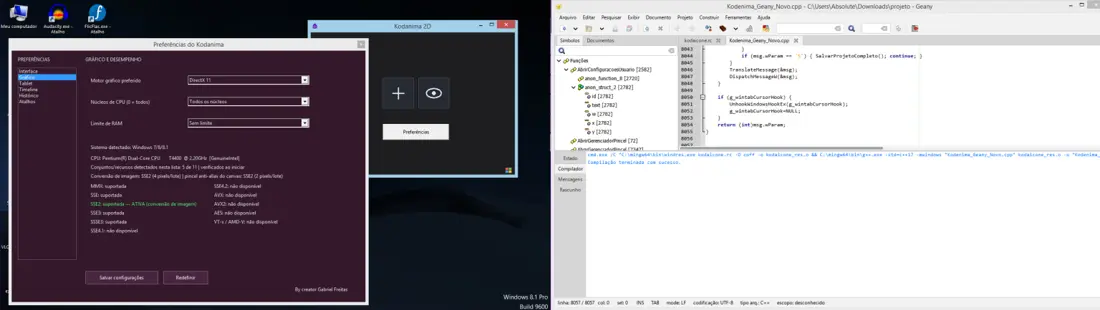
 Kodanima 2D — Setup